
Never miss a birthday or work anniversary again. Ricotta's birthday bot for Slack & Teams tracks dates and posts celebrations automatically. Try it free.

At work, birthdays and work anniversaries often slip through the cracks, making some employees feel forgotten. Celebrating a handful of employees while forgetting about others may not be the best for long-term employee satisfaction and may even surface some feelings of unfairness. On the flip side, it is not always easy to track every birthday and work anniversary while juggling millions of HR duties each day. But of course, there is a solution to avoid this altogether. This is where Ricotta Birthday Bot comes in. If you use Slack or Microsoft Teams, you’re sorted. Just install the Ricotta Birthday Bot on Slack or Microsoft Teams and let it handle all your office celebrations.
Let’s understand more about the tool in the next section.
Simply put, it is a bot or app that helps you automate celebrations without the need to maintain a spreadsheet. It manages date collection and celebrations for you end-to-end. Most birthday bots require just a one-time setup: you choose your preferred date collection method, celebration channel, celebration time, content pack, etc. Of course, it also has advanced settings like admin controls, holiday management, weekend manager, opt-out and more.
Now let’s get specific. Ricotta helps you effortlessly track and celebrate employee birthdays and work anniversaries with built-in birthday automation.
To start using Ricotta:
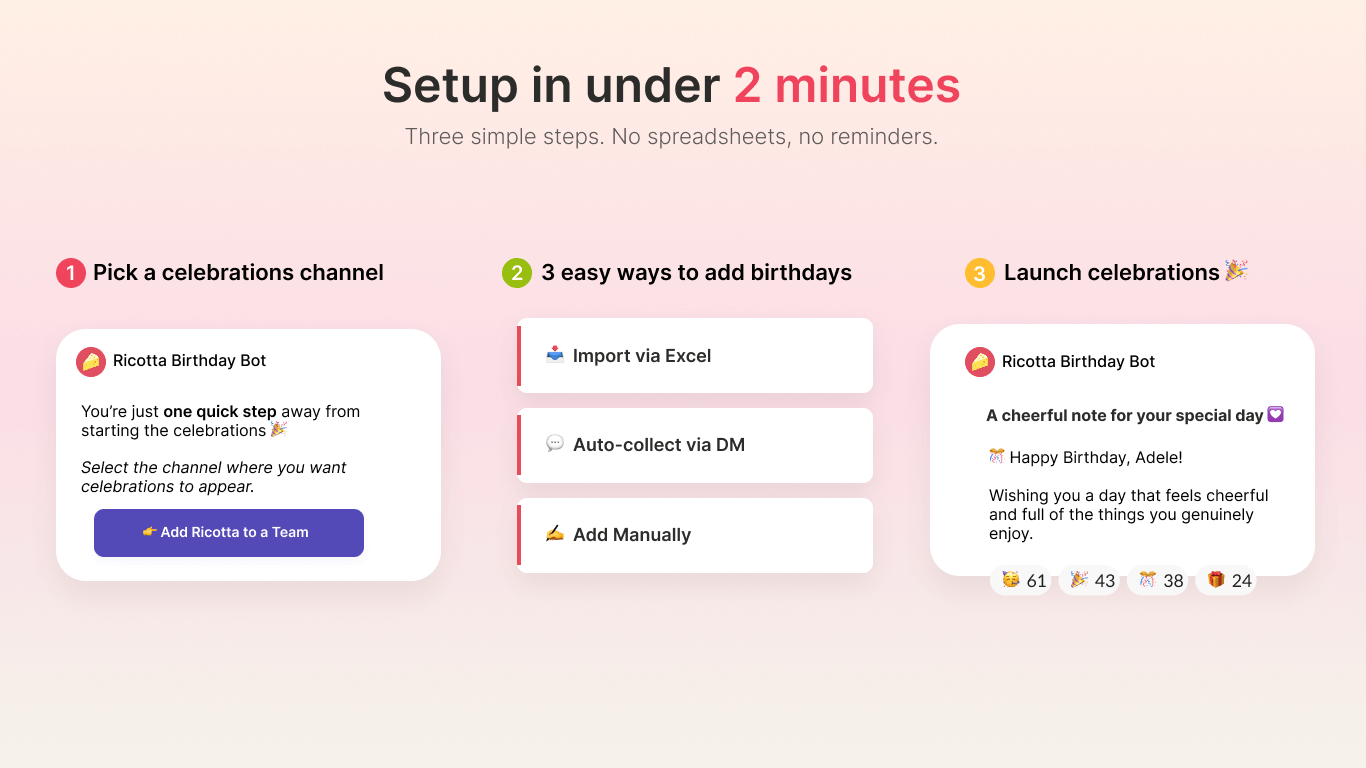
Here’s how Ricotta stands out from its competitors:
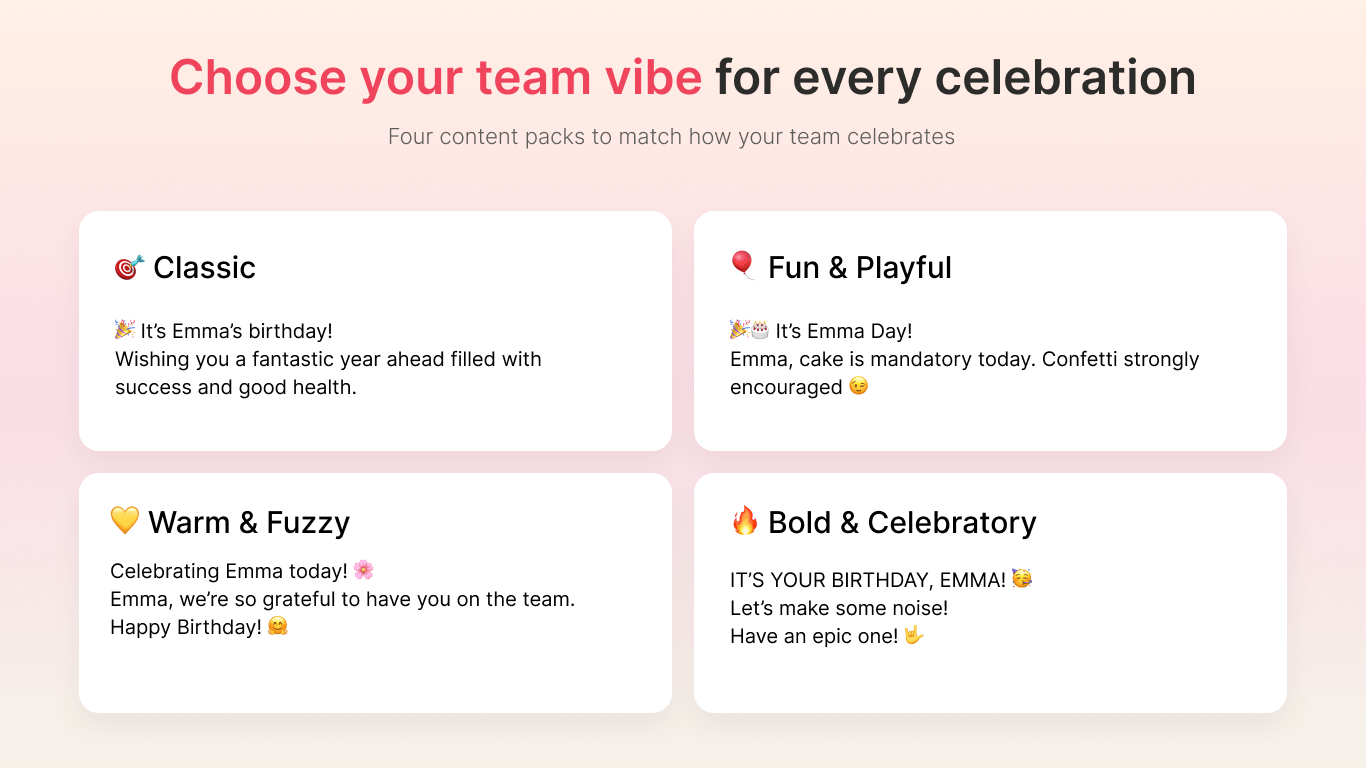
Match your team’s vibe with curated content packs:
Automatically celebrate on the Friday before or the Monday after. Sync with your custom holiday calendar to let the app know when the office is closed.
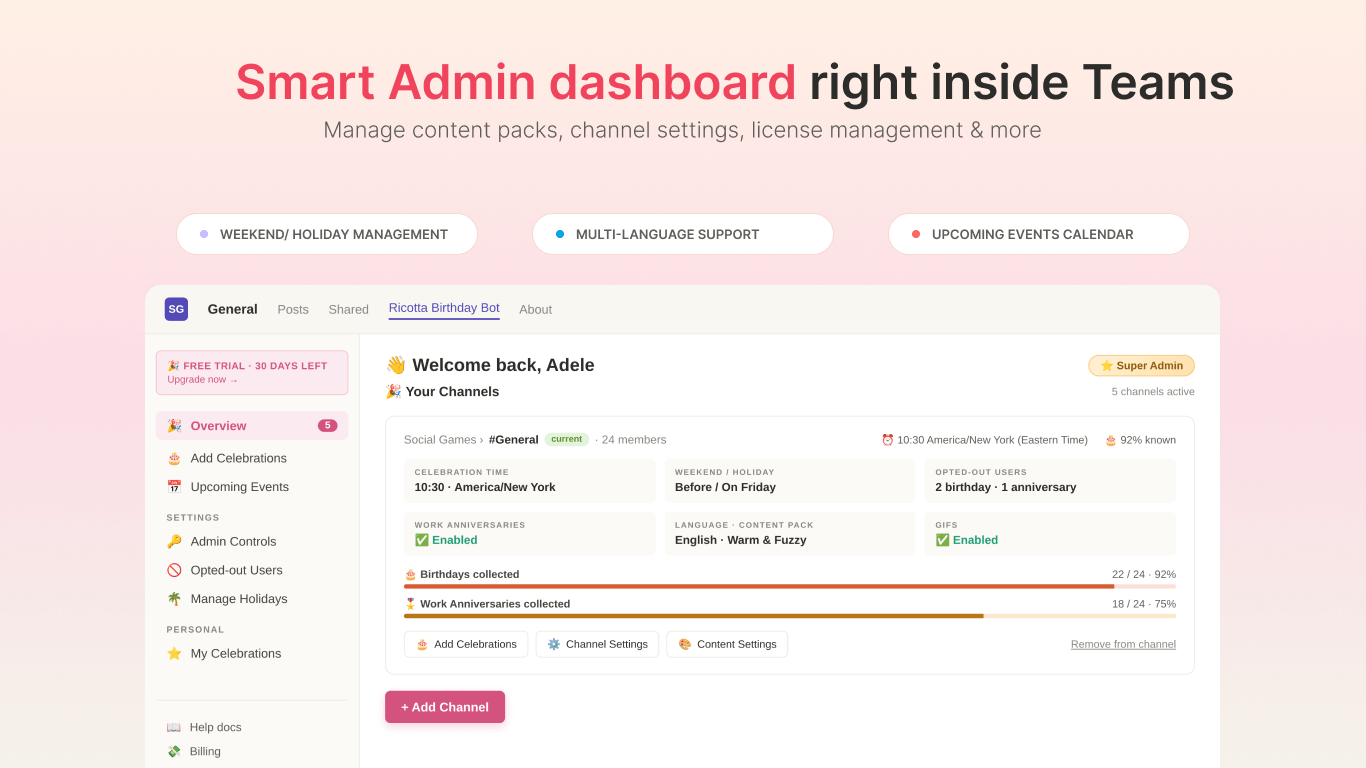
Admins can preview upcoming birthdays and work anniversaries
Manage scheduling, permissions, and content packs directly inside Slack or Teams. The app comes with a smart admin dashboard wherein you can manage everything from the app tab dashboard. Right from upcoming events to admin controls and holiday management.
We prioritize employee comfort. Teammates have total autonomy to opt out of celebrations.
Fully localized in English, Spanish, Japanese, and Korean for distributed and remote teams.
Ricotta Birthday Bot works in both Slack and Microsoft Teams. Depending on which platform you use, you can install it right where you work.
Start your 30-day free trial with no credit card
A birthday bot takes care of the end-to-end celebrations; however, there are a few things to keep in mind to keep things inclusive and comfortable.
Not everyone wants their birthday or anniversary announced to everyone at work. Always give them an option to choose whether to be celebrated and never display their birth year. A celebration should feel welcome, not awkward.
P.S. Ricotta Birthday Bot gives users an option to sit out their celebrations with its opt-out feature.
A dedicated channel, like #celebrations, keeps announcements easy to find and gives everyone a natural place to join in, without cluttering work channels. It also builds a shared space for team culture, especially for remote teams.
An automated message is a great start, but the replies are what make it meaningful. Encourage teammates to add a quick message, emoji, or GIF. Managers who reply first often set the tone for everyone else.
A birthday post that arrives in the middle of someone’s night is easy to miss. Schedule celebrations for the person’s local morning so they can enjoy the messages as they come in.
Avoid celebrations built around food, drinks, or activities that might leave people out. Simple, sincere recognition works for everyone, and it’s easy to keep up all year.
Nothing undermines team spirit faster than celebrating some people and forgetting others. Automating reminders means everyone gets the same attention, whether they’re the CEO or started last week.
Birthdays and work anniversaries are special moments and remembering them shows employees that they matter. So track celebration dates and make each employee’s day extra special. And of course, if tracking dates and maintaining spreadsheets is not your thing, Ricotta Birthday Bot will handle it for you. That leaves you free to focus on what makes celebrations meaningful: the personal messages, the shout-outs, and the sense that everyone on the team counts.
Start your 30-day free trial with no credit card
Try a desk decoration, a cake with the team, or a signed card. However, some people prefer low-key celebrations and just a message in your Slack channel is enough. You can use Ricotta to post birthday messages automatically so no one is missed.
A birthday bot for Microsoft Teams is an app that stores your team's birthdays and work anniversaries and posts celebration messages automatically in your Teams channels. Nobody has to track dates manually, and nobody gets forgotten.
Yes. Ricotta offers a free 30-day trial so you can start celebrating your team right away. We also offer free plans for up to 10 users.
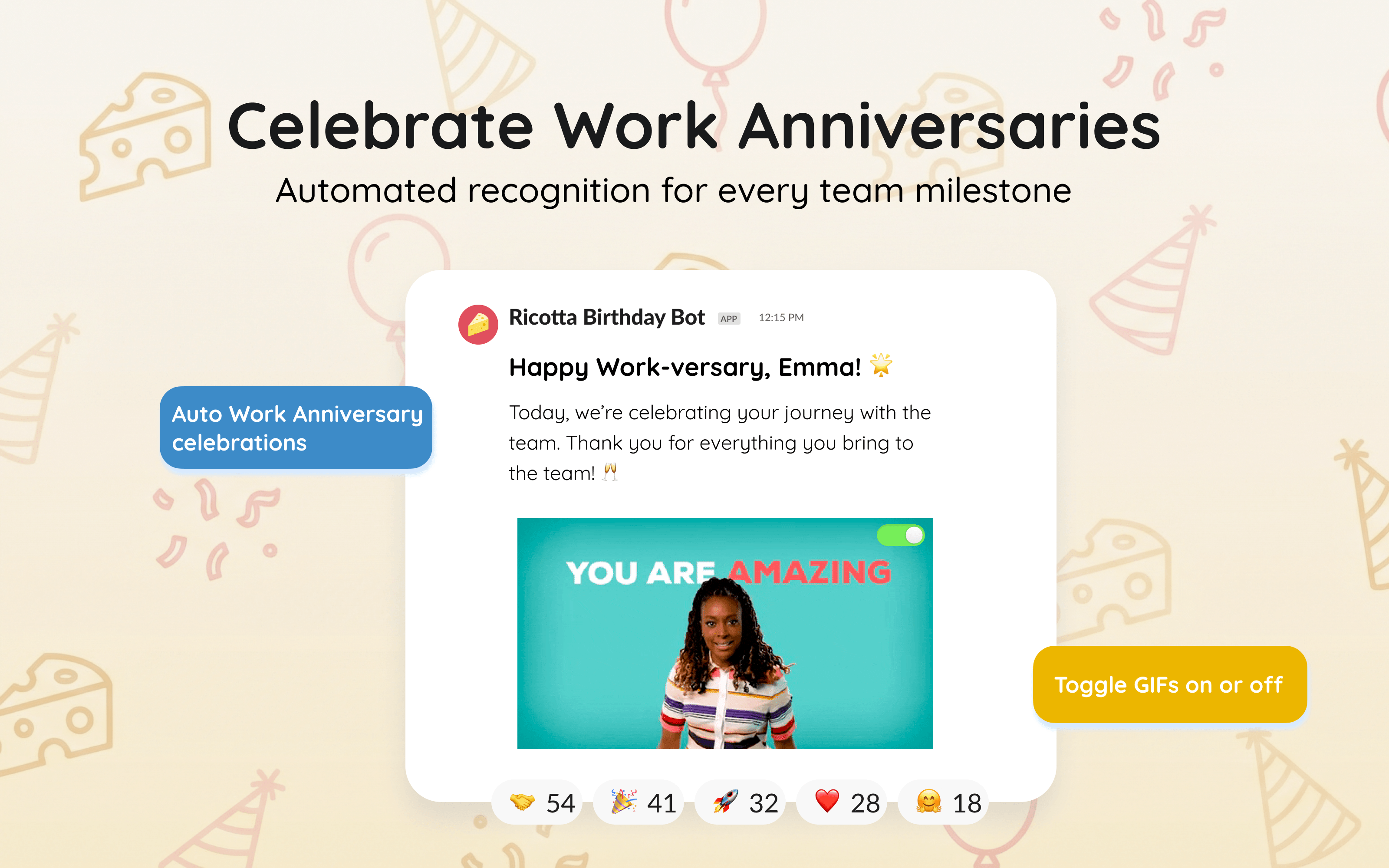
Yes. Ricotta celebrates work anniversaries as well as birthdays, so you can recognize each year someone spends with your team.
No. Employees only need to share the day and month of their birthday. Ricotta never displays ages or birth years. Additionally, anyone who prefers not to be celebrated can opt out at any time.
Employees can add their own birthdays, or admins can import dates in bulk from a spreadsheet. Once the dates are recorded, Ricotta handles everything automatically.
Yes. Ricotta posts celebrations based on each person's local time zone, so birthday messages are sent out according to the pre-set celebration time.
Yes. Ricotta is available on both Microsoft Teams and Slack, so companies that use either platform can celebrate their teams the same way.
Most teams are up and running in a few minutes. Install Ricotta, add it to a channel, collect birthdays, and it takes care of the rest.


Try Ricotta Games & Trivia


